Footer & Widgets
Essential steps to customizing the footer section and widgets of your site.
Footer Theme Options
To customize the footer head over to Dashboard > Kartd > Theme Options > Footer.
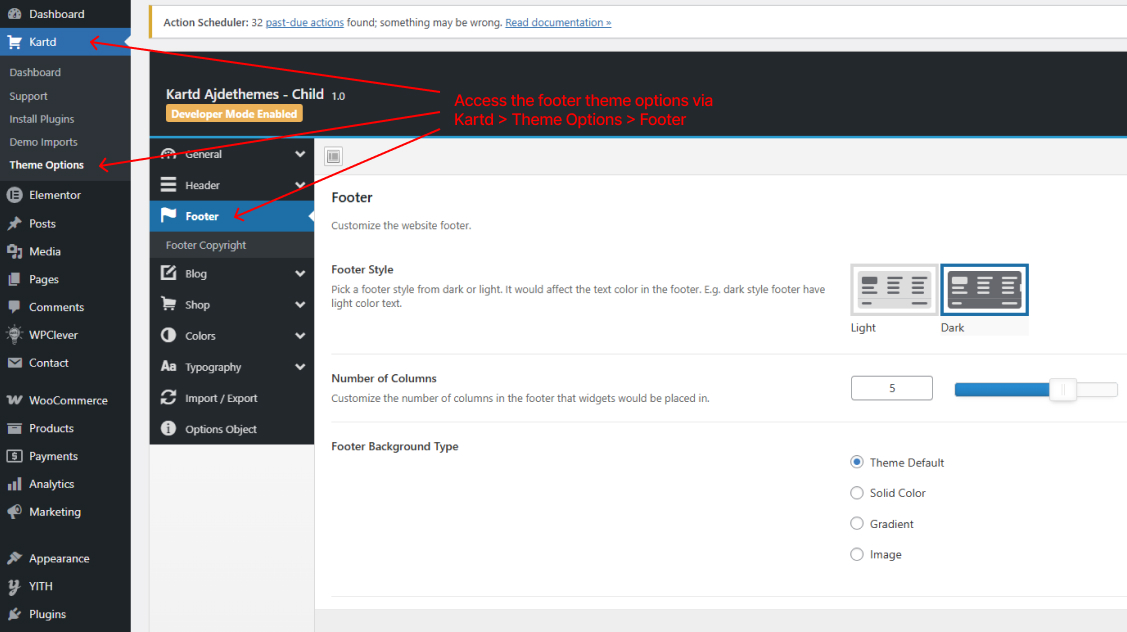
Here, Footer style option allow you change the text and widgets colors depending on your footer background, e.g. dark footer background - light footer text.
Number of columns - allows to split the footer widgets in a desired layout of columns per your choice.
To add content/widgets to the footer, navigate to Dashboard > Appearance > Widgets > Footer Widgets.
Footer Copyright Section
To customize the bottom most section of footer (copyright) navigate to Theme Options > Footer > Footer Copyright.
The footer copyright section registers Footer Copyright Widgets area, where you can add your own widgets, e.g. payment & social icons shortcodes.
payment icons shortcode example:
[payment_icons_list items="apple-pay, amazon-pay, paypal, amex, discover, visa, mastercard" /]
social icons shortcode example:
[social_icons]
[sc_icon icon="facebook-f" url="#" target="_blank"]
[sc_icon icon="instagram" url="#"]
[sc_icon icon="youtube" url="#"]
[sc_icon icon="tiktok" url="#"]
[sc_icon icon="x-twitter" url="#"]
[sc_icon icon="linkedin-in" url="#"]
[/social_icons]
When you edit the copyright text you can use links and shortcodes. Example use [ajdethemes_current_year] to output the current year that will change automatically every year based on the server time.